
 Arsalan Yasin
As an Odoo Functional Consultant, I often see businesses struggle not because of lack of inventory, but because of inefficient warehouse execution. Odoo 19 inventory management introduces powerful tools that help companies streamline operations, reduce errors, and scale confidently. Let’s explore how routes, putaway rules, and smart barcode workflows transform daily warehouse performance.
Understanding Warehouse Optimization in Odoo 19
Warehouse optimization is about designing smooth inventory movement with minimal manual intervention. Odoo warehouse efficiency optimization focuses on automation, accuracy, and speed across inbound, internal, and outbound processes.
Role of an Odoo Functional Consultant in Warehouse Design
An Odoo consultant analyzes business flows, storage logic, and logistics challenges, then configures Odoo warehouse automation features to match real operational needs instead of forcing generic setups.
Odoo 19 Inventory Management and Warehouse Structure
Odoo 19 inventory management offers flexible warehouse modeling that adapts to simple and complex operations.
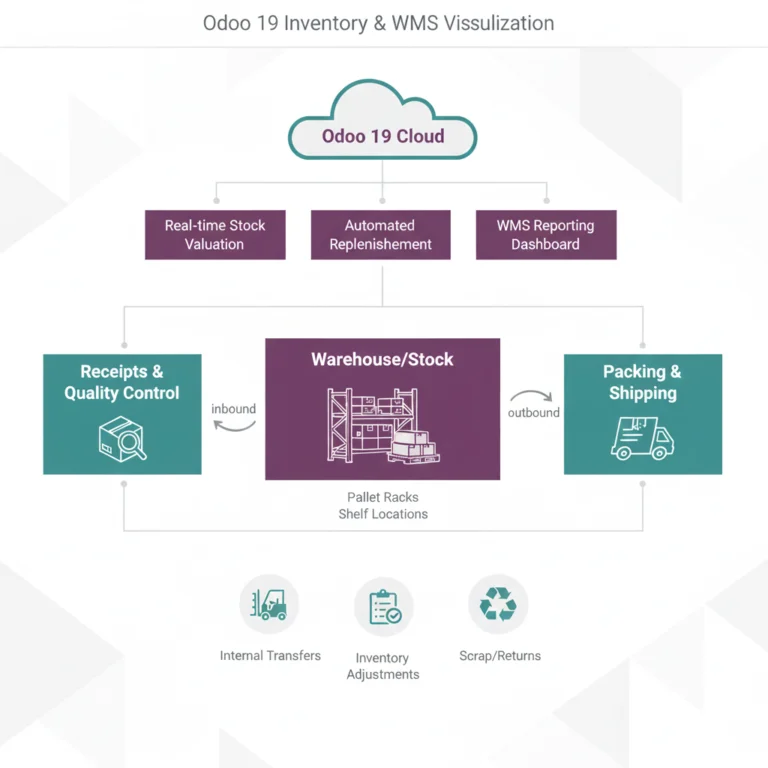
Designing an Efficient Odoo Warehouse Management System
Using the Odoo warehouse management system, warehouses can be structured by zones, shelves, and virtual locations, enabling precise inventory tracking and control.
Stock Locations and Warehouse Operations Flow
Odoo stock locations optimization ensures products move logically from receiving to storage, picking, packing, and shipping. This structured warehouse operations flow minimizes delays and picking errors.
Warehouse Routes Configuration in Odoo 19
Routes define how products move through the warehouse.
How Odoo Warehouse Routes Configuration Works
With Odoo warehouse routes configuration, businesses can automate make to order, cross docking, drop shipping, or internal transfers based on product or warehouse rules.
Internal Transfers and Advanced Routing Logic
Odoo internal transfers automation ensures seamless movement between locations or warehouses without manual tracking. Advanced warehouse workflows in Odoo allow complex routing without confusion.
Put-away Rules for Smart Stock Locations Optimization
Put-away rules decide where products are stored after receiving.
How Put-away Rules in Odoo Improve Storage Efficiency
Put-away rules in Odoo automatically assign optimal locations based on product type, volume, or category. This reduces congestion and improves picking speed.
To better organize stock placement and reduce picking time, explore this complete guide on setting up efficient putaway rules in Odoo for smarter warehouse operations.
Inventory Rules and Replenishment Strategy
With Odoo inventory rules and replenishment, stock levels remain balanced across locations, preventing overstocking or shortages.
Smart Barcode Workflows in Odoo 19
Barcode technology is a game changer for warehouses.
Odoo Barcode Inventory Workflows Explained
Odoo barcode inventory workflows allow real time validation of receiving, picking, packing, and transfers using mobile devices.
Smart Barcode Scanning for Stock Picking Automation
Smart barcode scanning Odoo eliminates manual entry and boosts Odoo stock picking automation accuracy. The Odoo barcode app for warehouse ensures faster execution with fewer mistakes.
Multi Warehouse and Logistics Management
Growing businesses often operate across multiple locations.
Multi Warehouse Management in Odoo
Multi warehouse management in Odoo centralizes inventory while maintaining individual warehouse control, improving decision making.
Odoo Logistics and Supply Chain Management
Odoo logistics management integrates inventory, procurement, and delivery, supporting a connected Odoo supply chain management strategy.
Benefits of Warehouse Automation Features in Odoo 19
Odoo inventory automation tools reduce manual workload, increase traceability, and support data driven decisions.
Improving Warehouse Efficiency and Inventory Control
By combining routes, put-away rules, and barcode scanning, businesses achieve better inventory accuracy, faster fulfillment, and scalable warehouse operations.
Conclusion
Warehouse optimization in Odoo 19 is not just about configuration, it’s about aligning technology with business reality. With proper setup of routes, putaway rules, and barcode workflows, companies gain full visibility and control over warehouse operations while reducing operational costs.
If you are planning to optimize or redesign your warehouse processes, book a consultation with an experienced Odoo Functional Consultant and turn your warehouse into a performance driven asset.
Frequently Asked Questions
1. How does Odoo 19 inventory management improve warehouse efficiency?
Odoo 19 automates stock movements, reduces manual errors, and provides real time inventory visibility.
2. What are put-away rules in Odoo used for?
Put-away rules automatically assign the best storage location for products after receiving.
3. Can Odoo handle barcode based warehouse operations?
Yes, Odoo supports smart barcode scanning for receiving, picking, packing, and transfers.
4. Is multi warehouse management supported in Odoo 19?
Odoo 19 supports centralized control with flexible multi warehouse configurations.
5. Do warehouse routes help reduce manual transfers?
Yes, automated routes minimize manual intervention and optimize internal stock movements.
For more practical insights on inventory automation, warehouse optimization, and real world Odoo use cases, visit my Odoo and ERP business insights blog to explore expert driven solutions and best practices.
