
Introduction
Recently, I encountered an interesting challenge in Odoo 18 Enterprise. Our finance team needed weekly reporting granularity, but the account_reports module only supported monthly, quarterly, and yearly filters. This limitation prompted me to find a solution that would integrate seamlessly with the existing Odoo structure.
The Solution: Custom Module with Week Filters
Rather than modifying the core files of Odoo, which would risk breaking future updates, I opted to build a custom module. This module provided a way to extend the AccountReportFilters component and allow weekly date filters in the reports. Here’s how I approached it:
-
JavaScript patches: Used to extend the
AccountReportFilterscomponent and inject the week filter functionality. -
Python inheritance: Leveraged to override the
_init_options_date()method for calculating week boundaries, ensuring the system accurately represents the start and end of each week. -
Conditional controls: Introduced a checkbox field to give users control over whether or not they want the week filter displayed in their reports.
Technical Highlights
JavaScript Patches
I utilized the patch() decorator from Owl to cleanly extend the AccountReportFilters component. This approach preserved the core functionality of the original component, while adding the necessary enhancements for weekly date ranges.
Implementing ISO Week Standard
I used the ISO week standard (Monday-Sunday) for calculating and displaying weekly periods. This ensures that the reports are consistent with international standards for week-based reporting.
Navigation Support
To make it easy to navigate through the weeks, I added previous/next week navigation buttons. This allows users to quickly jump to the previous or upcoming week in their reports.
Zero Modifications to Core Odoo Files
The entire solution was implemented within a custom module without modifying any core files of Odoo. This ensures that future updates to Odoo won’t conflict with the customizations, preserving an upgrade-friendly environment.
User Interface: How It Looks
In the Odoo interface, the weekly filter now appears as an option when generating reports. Here’s a look at how it works:
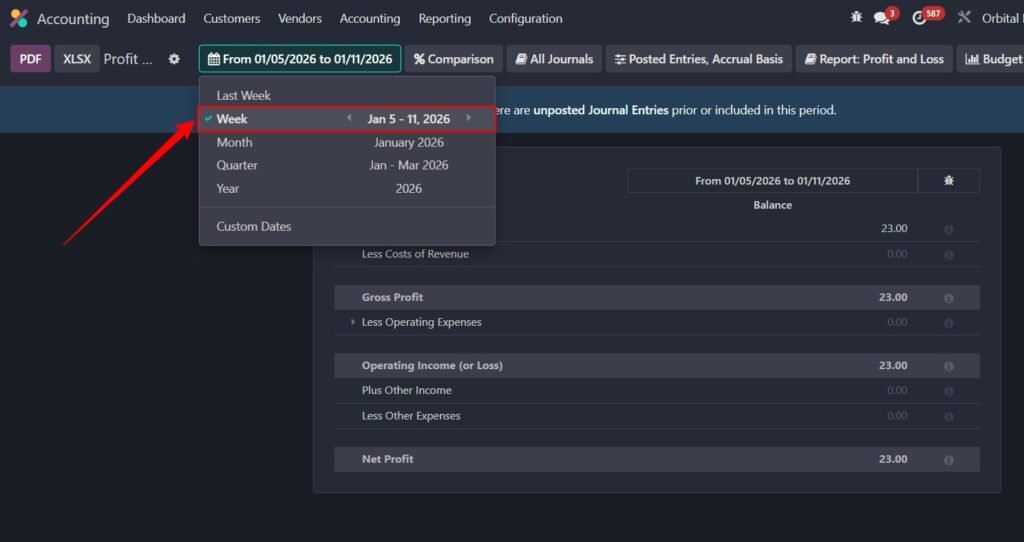
The user can select the week filter, and the report will show data for the selected week, based on the Monday-Sunday ISO week standard.
Key Takeaway: Flexible, Upgrade-Friendly Customization
When extending enterprise modules like Odoo, inheritance and patches offer a powerful and maintainable way to add custom functionality. The approach I took ensured the feature could be implemented without disrupting the existing system and without making modifications to core Odoo files.
Preventing Feature Bloat
By using a conditional checkbox, only reports that benefit from weekly analysis are given the option to display the week filter. This keeps the UI clean and user-friendly without introducing unnecessary features that could clutter the interface.
Need help applying this to your business?
Conclusion: Ready for Production
The module is now production-ready and fully compatible with Odoo’s standard reporting architecture. The custom weekly reporting feature integrates seamlessly with Odoo’s existing functionality while providing the flexibility the finance team needed.
If you’re looking to extend your Odoo 18 reports with custom filters and need expert assistance, book a consultation to discuss your customization needs.
You’re here because something matters.
If this decision impacts your operations, your team, or your growth
Let’s talk before it becomes harder to undo.
For more tips on customizing Odoo 18 and enhancing report functionality, check out my blog for practical solutions and expert advice on extending Odoo’s capabilities.
Built on Real Experience, Not Demos
Every solution you see here is based on real-world Odoo implementations, not theory or staged examples. These videos reflect actual challenges businesses face and the practical ways I solve them using clean, scalable Odoo customizations.
https://www.youtube.com/watch?v=yBFaFtKNhrUhttps://youtu.be/ns4AFiyKcekhttps://youtu.be/pN6SBJwkqEAhttps://youtube.com/shorts/XZxdbu241Nwhttps://youtube.com/shorts/tK17IQFKvr8?feature=share